**Privacy:** many pages on this wiki are public. Full names and role assignments are not considered private information. Personal contact details, such as phone numbers or personal email addresses, are considered private and should never be put on a public page. Refer to a role (e.g. "contact the Secretaris") or a shared club email address instead.
## Who can see and edit what - **Reading:** Most pages are public and can be read without logging in. Some pages are only visible to logged-in users. - **Editing:** In order to edit pages, your account role needs to be properly configured. Reach out to an admin user (a member of the board) to get this set up. - **Commenting:** Feel free to comment on any visible page if something can be improved. ### Creating an account You can create an account using the **Sign up** button in the top right of the window. Once your account exists, ask an admin (a member of the board) to give it the right role. `[TODO: decide how roles and permissions are set up (e.g. which roles exist, who can edit which books/chapters) and document it here]` ## How to use this wiki ### Finding your way around Content in BookStack is organised in a hierarchy, a bit like a library: - **Shelves** hold books. - **Books** (like this one) hold chapters and pages. - **Chapters** group related pages within a book. - **Pages** are where the content lives. See [Content overview](https://www.bookstackapp.com/docs/user/content-overview/) and [Getting around](https://www.bookstackapp.com/docs/user/getting-around/). Use the **search bar** at the top of every page to find anything quickly. It supports filters, e.g. by tag or by type of content. See [Searching](https://www.bookstackapp.com/docs/user/searching/). ### Giving feedback The easiest way to give feedback is to **leave a comment** at the bottom of the page in question. Use comments to: - point out something that is wrong or out of date; - ask a question about a process; - suggest an improvement. Active discussion helps us improve how the club runs, so don't hesitate. ### Editing and creating pages 1. Open the page and click **Edit** (top right). Make your changes and click **Save Page**. Every save is kept in the page's **revision history**, so mistakes can always be undone. 2. To create a new page, open the book or chapter it belongs in and click **New Page**. 3. **Start new pages from a template**, found in the [Bookstack templates](https://bookstack-9egpq-u79954.vm.elestio.app/books/the-ufo-wiki/chapter/bookstack-templates) chapter. When editing a page, open the **Templates** panel in the editor sidebar to insert one. See [Page templates](https://www.bookstackapp.com/docs/user/page-templates/). 4. **Link related pages** together. In the editor, use the link tool and search for the page you want to link to. Links stay working even if a page is renamed or moved. See [Content permalinks](https://www.bookstackapp.com/docs/user/content-permalinks/).We only use the default **WYSIWYG editor**. BookStack also has a Markdown editor, but it supports less rich content, so please don't switch to it.
Useful editor guides: - [WYSIWYG editor](https://www.bookstackapp.com/docs/user/wysiwyg-editor/) - [Diagrams](https://www.bookstackapp.com/docs/user/diagrams/), for flowcharts and process diagrams - [Attachments](https://www.bookstackapp.com/docs/user/attachments/), to attach files or links to a page - [Tags](https://www.bookstackapp.com/docs/user/tags/), to make pages easier to find ### Writing good pages - **Start with a short purpose statement** at the top (the general page template does this for you). - **Document things that will still be useful in a year.** Write down processes, knowledge and context, not current to-do lists or status updates. - **Link instead of duplicating.** If information already exists on another page (or in Google Drive), link to it. - **Keep it up to date.** If you notice something outdated, fix it or leave a comment. ## More help - [BookStack user documentation](https://www.bookstackapp.com/docs/user/) - Questions about the wiki itself: `[TODO: contact person/role]` # Volunteer roles This chapter provides an overview of the various volunteer roles in UFO, and (in individual pages) goes into the individual responsibilities of each role. # Volunteer roles overview**This page describes in general how the volunteer roles work at UFO.**
##### TODO: - Describe why we have volunteer roles - When are the volunteer roles decided? - What if I can no longer do a volunteer role? - What if someone isn't fulfilling their roles as a volunteer? - # Board - Secretaris**The goal of this page is to lay out everything that someone entering this role needs in order to succeed in this role. This includes vital information about the role (responsibilities, time commitments, where the role fits in the wider picture of UFO), as well as club knowledge that has built up that is directly relevant to this role. This page is meant to document information that is of direct use to future people within this role, and is not meant to track current work (which will become irrelevant in future).**
##### **Role overview** - **ℹ️ Role name:** Secretaris - **💪 Core goal:** Administration. To be the primary point of contact for those outside the club, to handle core administration tasks (such as field bookings, membership signups, and membership cancellations), and coordinate with the voorzitter to the smooth running of the club. - **⏰ Expected time commitment:** A couple hours a week at least. - **🔢 Number of people in this role:** FILL OUT - **💬 Communication (how do you coordinate with each other, how do you communicate this roles work to the rest of the club):** FILL OUT - 👥 **Related roles:** FILL OUT (BY LINKING TO THEIR PAGES) - **📄 Important pages:** - [Digital systems](https://wiki.ufofrisbee.nl/books/the-ufo-wiki/page/digital-systems-overview) - Processes - [Field and hall bookings](https://wiki.ufofrisbee.nl/books/the-ufo-wiki/page/field-and-hall-bookings) - [Member signups and cancellations](https://wiki.ufofrisbee.nl/books/the-ufo-wiki/page/member-signups-and-cancellations) ##### **Responsibilities** > In bullet-point form, what are the responsibilities of your role? - **Responding to emails in the secretaris inbox** - **Managing memberships in relevant digital systems** - **Signing up new members** - **Signing out old members** - **Assigning of NFB competition licenses** - **Ensuring volunteers have the needed VOGs for their roles** - **Processing bookings of locations (fields and halls)** - **Competition checks (ensuring that all players in teams have valid memberships and competition licenses)** - **Curating and sending out the UFO newslette**r ##### **Non-responsibilities** > What are the non-responsibilities in your role? (things that one might *think* fall into this role, but actually fall into the responsibilities of another role). When referencing another role here, please link to their role page. - **Handling of membership payments** - ---The above section is the same across all volunteer role pages. The rest of the page is up to you, as someone within this role, to customise and update as you see fit.
#### **Handover documentation** > What information have you built up in your role that would be important for a future person in this role to know? Document them here. This could be important contacts, experience you've had, recurring process checklists, and event planning. # Access to the VechtzoomDescribes how to access the Vechtzoom facilities that we use as a club.
The Vechtzoom is located at [Rio de Janeirodreef 203, 3563 VS Utrecht](https://maps.app.goo.gl/o2QYjRnEYzmQWTYh7) , and is our main training location for outdoor play. The location has the following facilities which we use: - Two fields available for booking (one grass, one artificial) - The fields are the size of a regulation football field - Storage - Changing room - A clubhouse (shared with the hockey club) TODO: - Insert map and photos of where everything is - Make and link a page "Access codes to the Vechtzoom" . This will be a private page with access on a need-to-know basis - Insert instructions on how to manage the bar area etc. # Processes This chapter documents processes that are core to the functioning of the club. We are continually looking to streamline our processes, while also introducing automation where it would save time (i.e., for repetitive frequent tasks) or have other benefits (e.g., improved transparency). If you have any ideas on how we can streamline our processes, we would like to know. # Field and hall bookingsDescribes the process of field and hall bookings from the wider perspective of the club as a whole. Role-specific information about how to do field bookings, and how to track them for invoicing can be found on the [Secretaris volunteer page](https://bookstack-9egpq-u79954.vm.elestio.app/books/the-ufo-wiki/page/board-secretaris) .
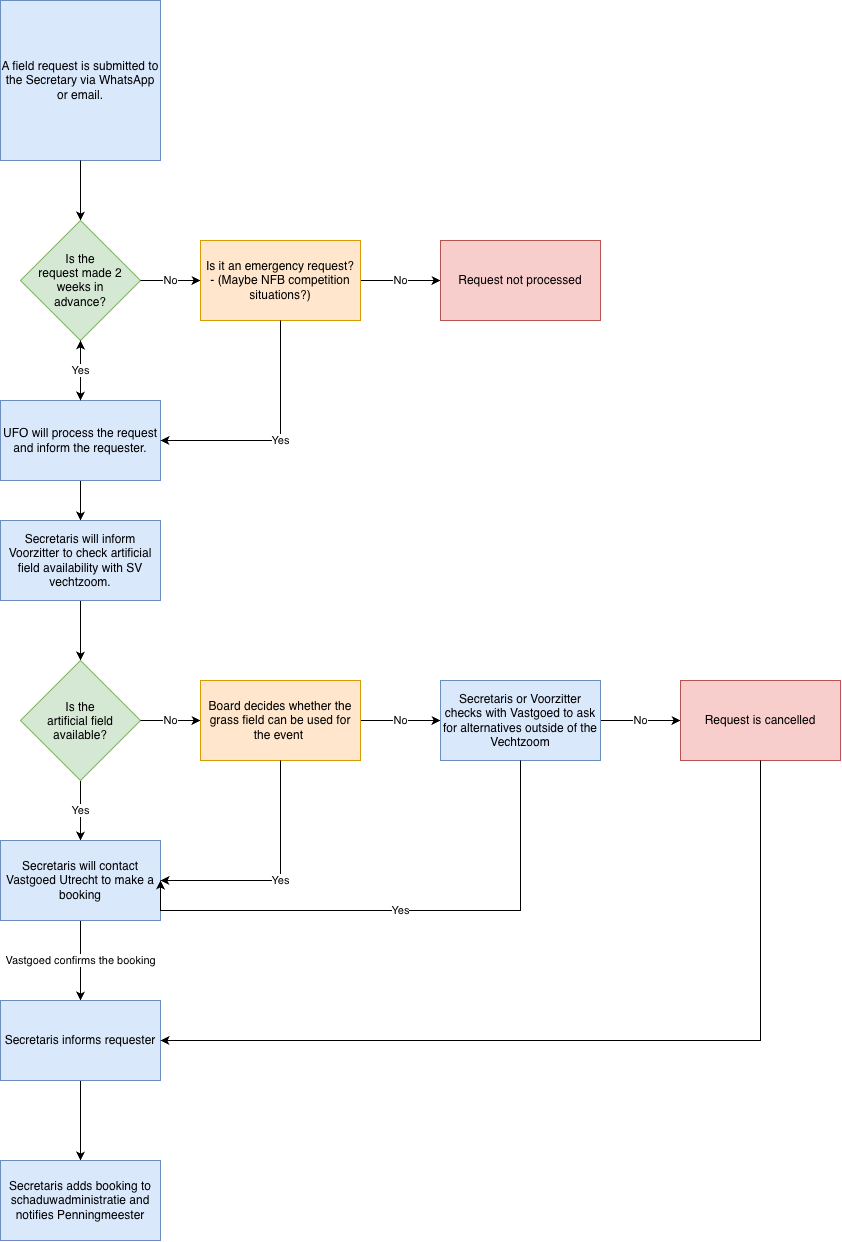
## Field bookings This flowchart describes the process of how field bookings are made by UFO for their members or for the NFB.Describes the process of member signups and cancellations from the perspective of members and the club as a whole. Role-specific information about how to process signups can be found on the [Secretaris volunteer page](https://bookstack-9egpq-u79954.vm.elestio.app/books/the-ufo-wiki/page/board-secretaris) .
TODO: - What is the current (manual) system - Create and link to the digital systems page detailing the mailing list, wordpress, allunited - What improvements can be made in future to streamline this signup and signout process - Add documentation on special non-paying memberships - Decide whether membership prices etc lives on this page, or in the website(?) # Digital systems overviewProvides a high-level overview of the all digital systems used within the club (i.e., member-facing systems, systems used by the board, systems used by the social media team).
TODO: - AllUnited - Wordpress website - Mailing lists - Gmail accounts - WhatsApp group - Social media accounts - Should the systems be documented in the individual roles, or in a central place here? Or both? - I think both would be helpful (but making sure the vol pages have a link to this page, so that we can use back-refs to find it again) - # The Board # Bookstack templates # (TEMPLATE) Volunteer role description**The goal of this page is to lay out everything that someone entering this role needs in order to succeed in this role. This includes vital information about the role (responsibilities, time commitments, where the role fits in the wider picture of UFO), as well as club knowledge that has built up that is directly relevant to this role. This page is meant to document information that is of direct use to future people within this role, and is not meant to track current work (which will become irrelevant in future).**
##### **Role overview** - **ℹ️ Role name:** FILL OUT - **💪 Core goal:** FILL OUT - **⏰ Expected time commitment:** FILL OUT - **🔢 Number of people in this role:** FILL OUT - **💬 Communication (how do you coordinate with each other, how do you communicate this roles work to the rest of the club):** FILL OUT - 👥 **Related roles:** FILL OUT (BY LINKING TO THEIR PAGES) - **📄 Important pages:** FILL OUT (or put N/A if this page contains everything needed for the role) ##### **Responsibilities** > In bullet-point form, what are the responsibilities of your role? - **FILL OUT** ##### **Non-responsibilities** > What are the non-responsibilities in your role? (things that one might *think* fall into this role, but actually fall into the responsibilities of another role). When referencing another role here, please link to their role page. - **FILL OUT** ---The above section is the same across all volunteer role pages. The rest of the page is up to you, as someone within this role, to customise and update as you see fit.
#### **Handover documentation** > What information have you built up in your role that would be important for a future person in this role to know? Document them here. This could be important contacts, experience you've had, recurring process checklists, and event planning. # (TEMPLATE) General page - insert this this in general for new pagesA description at the top of the page that describes the purpose of this page.